Electrical › Car power supply/cigarette lighter › Diagnosis
后排USB接口不能充电 · T00611798

 The rear USB port cannot be charged后排USB接口不能充电

①General inspection一般检查
1. Power state is "OFF", disconnect the negative terminal of the 12V battery.电源状态“OFF”,断开蓄电池负极。
2. Check whether the rear USB interface harness is damaged or broken.检查后排USB接口线束是否存在损坏、断裂等现象。
3. Check the rear USB interface harness connector for loose connections or damage.检查后排USB接口线束接插件是否存在虚接、损坏等现象。
Are the test results normal?检查结果是否正常?
Yes → Go to step 2.是>>去步骤2。
No → Repair or replace the faulty wiring harness or connector.否>>维修或更换故障线束或接插件。
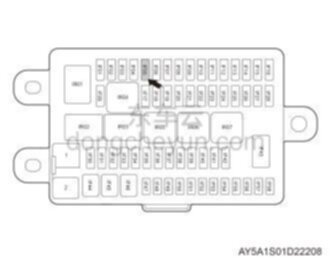
②Check fuse检查保险丝
Graphic
1. Power state is "OFF", disconnect the negative terminal of the 12V battery.电源状态“OFF”,断开蓄电池负极。
2. Check whether the fuse IF05 in the electrical box on the instrument panel is normal.检查仪表板电器盒中保险丝IF05是否正常。
IF05:10A
Are the test results normal?检查结果是否正常?
Yes → Go to step 3.是>>去步骤3。
No → Replace the fuse with the same specification.否>>更换相同规格保险丝。
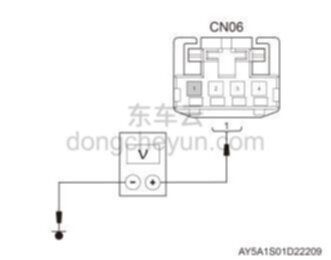
③Check the rear USB interface power supply harness检查后排USB接口供电线束
Graphic
1. Power state is "OFF", disconnect the negative terminal of the 12V battery.电源状态“OFF”,断开蓄电池负极。
2. Disconnect the rear USB interface harness connector CN06.断开后排USB接口线束接插件CN06。
3. Connect the negative terminal of the 12V battery and the power status is "ON".连接蓄电池负极,电源状态“ON”。
4. Use a digital multimeter to measure the voltage between pin 1 of CN06 and ground.用数字万用表测量CN06的1号针脚与接地之间的电压。
Standard voltage value: about 14V标准电压值:约14V
Are the test results normal?检查结果是否正常?
Yes → Go to step 4.是>>去步骤4。
No → Repair or replace the rear USB interface power supply harness.否>>维修或更换后排USB接口供电线束。
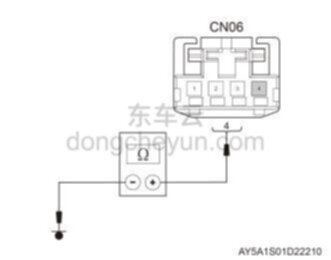
④Check the rear USB interface grounding harness检查后排USB接口接地线束
Graphic
1. Power state is "OFF", disconnect the negative terminal of the 12V battery.电源状态“OFF”,断开蓄电池负极。
2. Disconnect the rear USB interface harness connector CN06.断开后排USB接口线束接插件CN06。
3. Use a digital multimeter to measure the resistance between pin 4 of CN06 and ground.用数字万用表测量CN06的4号针脚与接地之间的电阻。
Standard resistance value: <1标准电阻值:<1 Ω
Are the test results normal?检查结果是否正常?
Yes → Go to step 5.是>>去步骤5。
No → Repair or replace the rear USB interface grounding harness.否>>维修或更换后排USB接口接地线束。
⑤Replace the rear USB port更换后排USB接口
1. Replace the rear USB interface and check whether the fault is rectified.更换后排USB接口,检查故障是否排除。
Are the test results normal?检查结果是否正常?
Yes → Fault resolved.是>>故障排除。
No → Find the cause from other fault symptoms.否>>从其他故障现象查找原因。