 Driver monitoring system not working驾驶员监测系统不工作
|
①Check the wiring harness connector检查线束接插件
|
||||||||||
Are the test results normal?检查结果是否正常?
Yes → Go to step 2.是>>去步骤2。
No → Repair or replace the faulty wiring harness or connector.否>>维修或更换故障线束或接插件。
|
||||||||||
|
②Check the vehicle infotainment head unit fault code检查车载智能多媒体主机故障码
|
||||||||||
Are the test results normal?检查结果是否正常?
Yes → Go to step 3.是>>去步骤3。
No → Troubleshoot the fault of the vehicle-mounted intelligent multimedia host according to the fault code.否>>根据故障码排除车载智能多媒体主机故障。
|
||||||||||
|
③Check driver condition monitoring camera wiring检查驾驶员状态监测摄像头线路
|
||||||||||
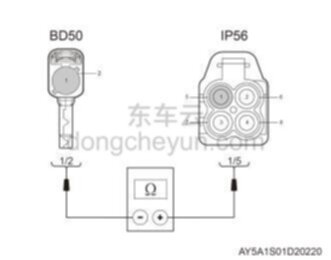 |
Are the test results normal?检查结果是否正常?
Yes → Go to step 4.是>>去步骤4。
No → Repair or replace the driver condition monitoring camera wiring harness.否>>维修或更换驾驶员状态监测摄像头线束。
|
|||||||||
|
④Replace driver status monitoring camera更换驾驶员状态监测摄像头
|
||||||||||
Are the test results normal?检查结果是否正常?
Yes → Fault resolved.是>>故障排除。
No → Find the cause from other fault symptoms.否>>从其他故障现象查找原因。
|
||||||||||