Removal procedure拆卸程序
|
|
1. Preparation1. 准备工作
1 Park the vehicle on a flat road, activate the parking brake, and put the vehicle's power supply in the "OFF" state.将车辆停在平坦路面,启用驻车制动,使整车电源处于“OFF”状态。
2 Disconnect the negative terminal of the 12V battery.断开蓄电池负极。
|
|
|
2. Remove the touch control screen2. 拆卸触摸控制屏
|
|
|
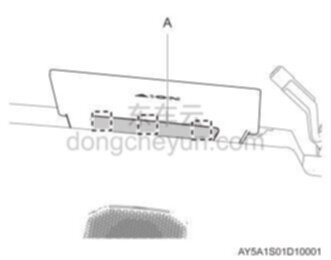
1 Pry open the display back cover trim panel A.撬开显示屏后盖饰板A。
|
|
Recommended tools: Interior parts removal tools推荐工具:内饰件拆卸工具 |
|
|
 Note:提示: |
|
♦
|
Pay attention to the 3 claw positions in the picture.注意图示3处卡爪位置。 |
|
|
|
|
|
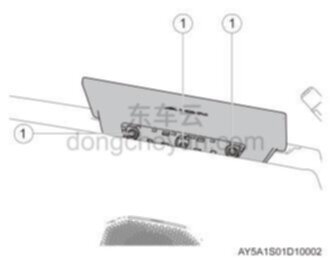
2 Remove the 3 fixing bolts ① and remove the touch control screen harness.拆卸3颗固定螺栓①,取下触摸控制屏带线束。
|
|
Recommended tools: 10mm socket推荐工具:10mm套筒 |
|
|
|
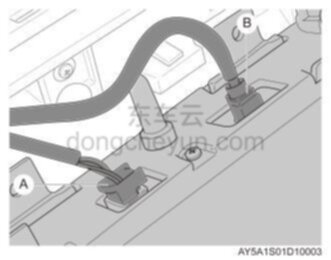
3 Disconnect connectors A and B, and remove the touch control panel.断开接插件A、B,取下触摸控制屏。
|
Installation procedure安装程序
|
|
1. Install the touch control panel1. 安装触摸控制屏
|
|
|
1 Connect connectors A and B to the touch control panel.连接接插件A、B到触摸控制屏。
|
|
|
2 Place and adjust the touch control screen to the installation position, install and tighten the 3 fixing bolts ①.放置并调整触摸控制屏到安装位置,安装3颗固定螺栓①并紧固。
|
|
Recommended tools: 10mm socket推荐工具:10mm套筒 |
|
|
|
Note:提示: |
|
♦
|
Be careful when installing to avoid the bolts falling into the instrument panel.安装时应谨慎操作,避免螺栓掉入仪表板内。 |
|
|
|
|
|
3 Place and adjust the display back cover trim panel A to the installation position, align the 3 claw positions shown in the figure and press firmly to ensure that it is installed in place.放置并调整显示屏后盖饰板A到安装位置,对准图示3处卡爪位置用力按压确保安装到位。
|
|
|
2. Connect the negative terminal of the 12V battery, start the vehicle, and check that the touch control screen should work normally.2. 连接蓄电池负极,启动车辆,检查触摸控制屏应正常工作
|
 Touch control screen触摸控制屏