|
①Power on check上电检查
|
|
1. |
Repower the vehicle, use the diagnostic tool to read and clear the fault codes, and check whether the fault codes and symptoms are eliminated.车辆重新上电,使用诊断仪读取并清除故障码,检查故障码及症状是否排除。
|
Are the test results normal?检查结果是否正常?
|
Yes是 |
Fault resolved.故障排除。 |
|
|
②General inspection一般检查
|
|
1. |
Power state is "OFF", disconnect the negative terminal of the 12V battery.电源状态“OFF”,断开蓄电池负极。 |
|
2. |
Check whether the wire harness of the mobile phone's wireless charging module is damaged or broken.检查手机无线充电模块线束是否存在损坏、断裂等现象。 |
|
3. |
Check whether there is any loose connection or damage to the wireless charging module harness connector of the mobile phone.检查手机无线充电模块线束接插件是否存在虚接、损坏等现象。 |
Are the test results normal?检查结果是否正常?
|
No否 |
Repair or replace faulty wiring harness or connector.维修或更换故障线束或接插件。 |
|
|
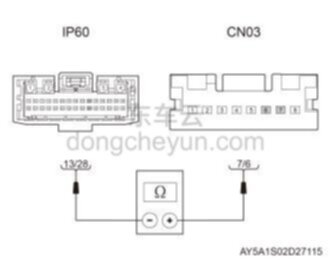
③Check the communication harness between the gateway controller and the mobile phone wireless charging module检查网关控制器与手机无线充电模块之间的通讯线束
|
 |
|
1. |
Power state is "OFF", disconnect the negative terminal of the 12V battery.电源状态“OFF”,断开蓄电池负极。 |
|
2. |
Disconnect the gateway controller (Ethernet) harness connector IP60 and the mobile phone wireless charging module harness connector CN03.断开网关控制器(以太网)线束接插件IP60和手机无线充电模块线束接插件CN03。 |
|
3. |
Use a digital multimeter to measure the resistance between pins 13/28 of IP60 and pins 7/6 of CN03.使用数字万用表测量IP60的13/28号针脚与CN03的7/6号针脚之间的电阻。 Standard resistance value: <1标准电阻值:<1
Ω
|
Are the test results normal?检查结果是否正常?
|
No否 |
Repair or replace the faulty wiring harness.维修或更换故障线束。 |
|
|
④Check the mobile phone wireless charging module检查手机无线充电模块
|
|
1. |
Power status "OFF".电源状态“OFF”。
|
|
2. |
Connect the diagnostic tool.连接诊断仪。
|
|
3. |
Power status "ON".电源状态“ON”。
|
|
4. |
Use the diagnostic tool to check whether the wireless charging module of the mobile phone is normal.使用诊断仪检查手机无线充电模块是否正常。 |
Are the test results normal?检查结果是否正常?
|
No否 |
Repair the mobile phone wireless charging module.检修手机无线充电模块。 |
|
|
⑤Replace gateway controller更换网关控制器
|
|
1. |
Replace with a new gateway controller and check whether the fault code and symptoms are eliminated.更换新的网关控制器,检查故障码及症状是否排除。
|
Are the test results normal?检查结果是否正常?
|
Yes是 |
Fault resolved.故障排除。 |
|
No否 |
Look for causes from other symptoms.从其他症状查找原因。 |
 Caution:注意: |
|
♦
|
After replacing the gateway controller, you need to use a diagnostic tool to recalibrate the gateway controller.更换网关控制器后,需用诊断仪对网关控制器重新标定。 |
|
|
 U158087 - TroubleshootingU158087-故障诊断