|
①Check 12V battery voltage检查蓄电池电压
|
|
1. |
Power state is "OFF", disconnect the negative terminal of the 12V battery.电源状态“OFF”,断开蓄电池负极。
|
|
2. |
Use a digital multimeter to measure the voltage between the positive and negative terminals of the 12V battery.用数字万用表测量蓄电池正、负极之间的电压。
Standard voltage value: about 12.5V标准电压值:约12.5V
|
Are the test results normal?检查结果是否正常?
|
|
②Check DCDC output voltage检查DCDC输出电压
|
|
1. |
Power status "ON".电源状态“ON”。
|
|
2. |
Use a digital multimeter to measure the voltage between the positive and negative terminals of the 12V battery.用数字万用表测量蓄电池正、负极之间的电压。
Standard voltage value: about 14V标准电压值:约14V
|
Are the test results normal?检查结果是否正常?
|
Yes是 |
Charge the 12V battery and replace it if necessary.对蓄电池进行充电,必要时更换蓄电池。 |
|
No否 |
Inspect DCDC and its lines.检修DCDC及其线路。 |
|
|
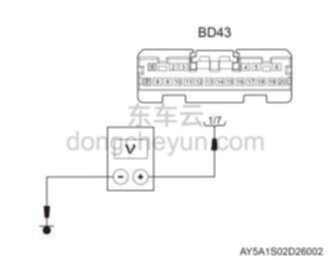
③Check the power supply line of the smart Bluetooth module检查智能蓝牙模块供电线路
|
 |
|
1. |
Power status "ON".电源状态“ON”。
|
|
2. |
Use a multimeter to measure the voltage between pin 1/7 of the BD43 and ground.使用万用表测量BD43的1/7号针脚与接地之间的电压。 Standard voltage value: about 14V标准电压值:约14V
|
Are the test results normal?检查结果是否正常?
|
No否 |
Check the power supply line of the smart Bluetooth module.检修智能蓝牙模块供电线路。 |
|
|
④Replace the smart Bluetooth module更换智能蓝牙模块
|
|
1. |
Replace with a new smart Bluetooth module and check whether the fault code and symptoms are eliminated.更换新的智能蓝牙模块,检查故障码及症状是否排除。
|
Are the test results normal?检查结果是否正常?
|
Yes是 |
Fault resolved.故障排除。 |
|
No否 |
Look for causes from other symptoms.从其他症状查找原因。 |
 Caution:注意: |
|
♦
|
After replacing the smart Bluetooth module, you need to use a diagnostic tool to recalibrate the smart Bluetooth module.更换智能蓝牙模块后,需用诊断仪对智能蓝牙模块重新标定。 |
|
|
 B2E8016 - TroubleshootingB2E8016-故障诊断