Panoramic view monitor (PVM)
Text of these pages
Page 142
WARNING (Cont'd)
◆ The RPA sensors have blind spots while they detecting obstacles. During reversing, the driver shall observe the surrounding environment carefully to avoid scratches or collisions.
◆ Please control the speed when reversing to avoid danger. When the RPA sends the continuous audible alarms, it indicates that the vehicle is extremely close to the detected obstacle, and reversing shall be stopped immediately to prevent an accident.
NOTE
◆ When the reversing speed is too high, the RPA may not work.
◆ When the vehicle is reversing at a narrow place or on an uphill slope, the RPA sensors may not detect railings, trees or slope surfaces, which is normal.
◆ The surface of some materials cannot reflect the signal from the RPA sensor, so that the RPA sensor cannot detect such materials or people wearing the clothing made of such materials.
◆ Noise sources outside the car may interfere with the radar sensor, making it impossible to detect any target.
◆ Please refer to "Parking - Parking Assist - PVM" for the precautions for using the RPA sensor.
Panoramic view monitor (PVM)
The PVM processes the video signals collected by the front, rear, left and right panoramic cameras of the vehicle, and displays the panoramic image around the vehicle on the center console display to provide the driver with the information on the surrounding environment of the vehicle and to reduce blind spots during driving. It can also realize vehicle trajectory prediction, so that the driver can fully understand the running direction of the vehicle and ensure driving safety.
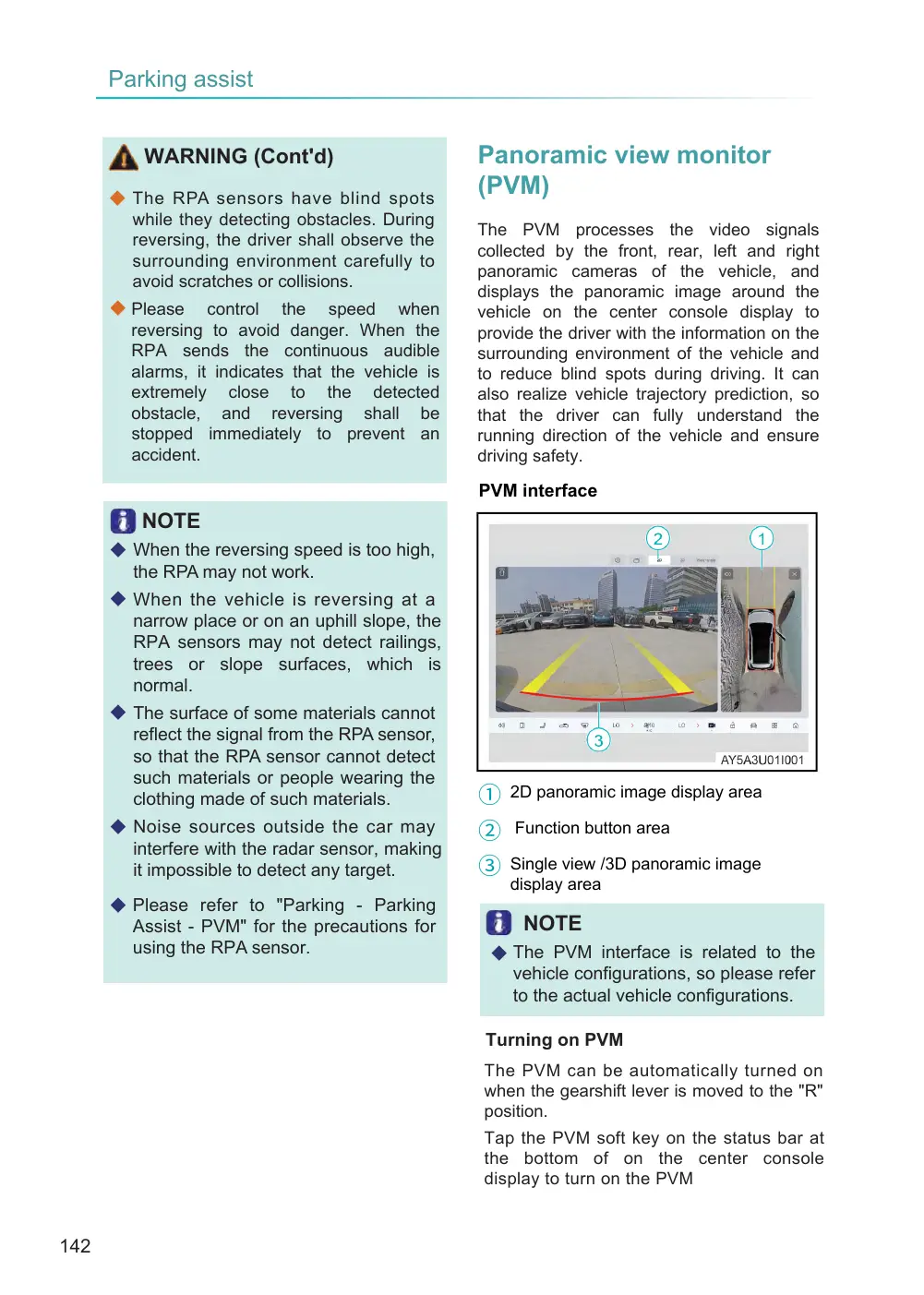
PVM interface
① 2D panoramic image display area
② Function button area
③ Single view /3D panoramic image
display area
NOTE
◆ The PVM interface is related to the vehicle configurations, so please refer to the actual vehicle configurations.
Turning on PVM
The PVM can be automatically turned on when the gearshift lever is moved to the "R" position.
Tap the PVM soft key on the status bar at the bottom of on the center console display to turn on the PVM
Page 143
Press the button on the steering wheel (set the custom button on the center console display as one-button PVM) to turn on PVM. The vehicle allows activating the surround view monitor (SVM) system via voice command.
Settings of PVM PVM can be set in the function button area.
◇ Panoramic image interface switching
- Click the 2D/3D/wide-angle image switch soft key to switch the panoramic image display effects.
◇ Rearview mirror control switch – Click to control the folding, unfolding, and tilting down functions of the rearview mirror. For a description of the reversing tilt down function of the exterior rearview mirror, refer to the section “Parking—Parking Assistance—Exterior Rearview Mirror Reversing Tilt Down.”
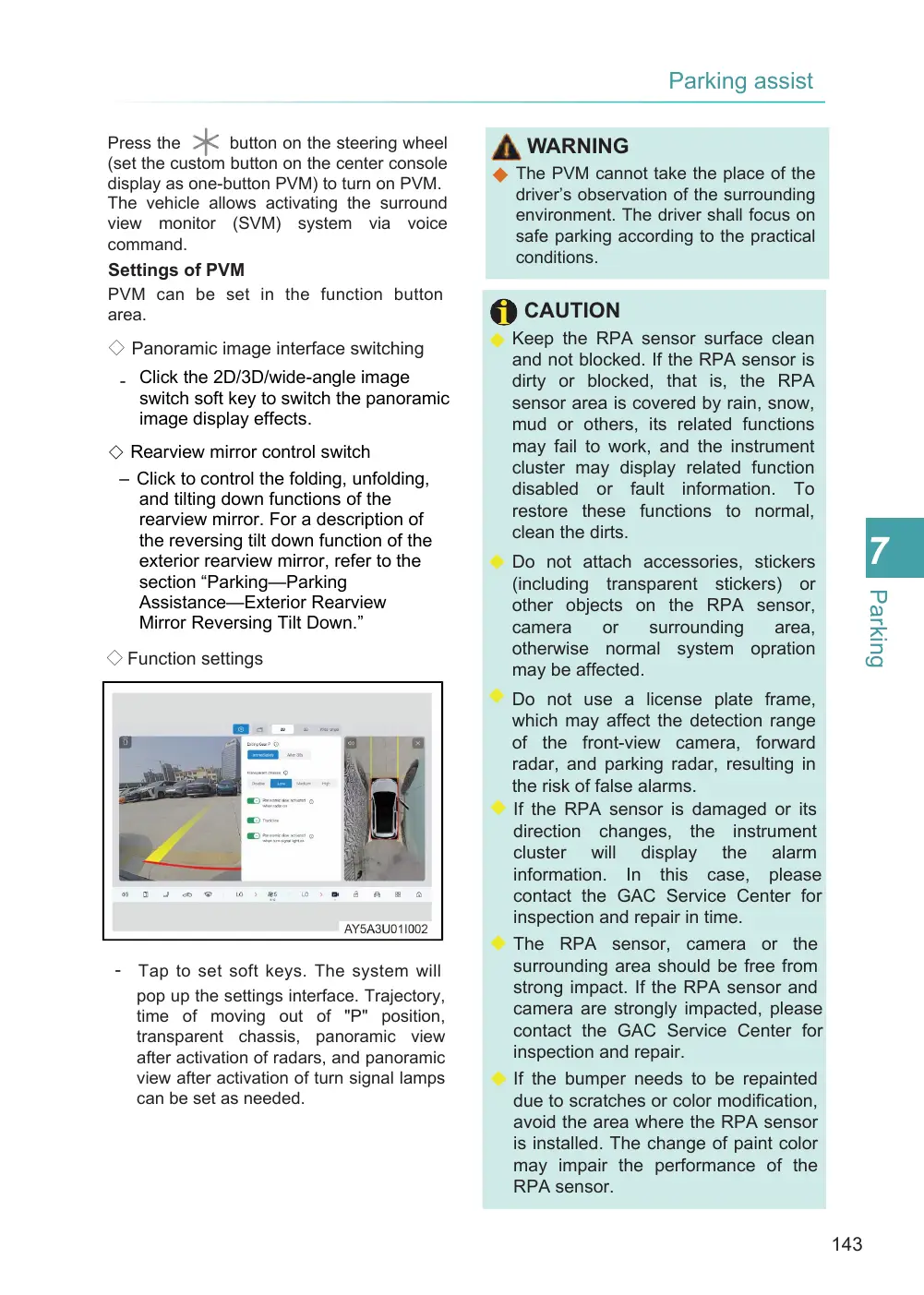
◇ Function settings
- Tap to set soft keys. The system will pop up the settings interface. Trajectory, time of moving out of "P" position, transparent chassis, panoramic view after activation of radars, and panoramic view after activation of turn signal lamps can be set as needed.
WARNING
◆ The PVM cannot take the place of the driver’s observation of the surrounding environment. The driver shall focus on safe parking according to the practical conditions.
CAUTION
◆ Keep the RPA sensor surface clean and not blocked. If the RPA sensor is dirty or blocked, that is, the RPA sensor area is covered by rain, snow, mud or others, its related functions may fail to work, and the instrument cluster may display related function disabled or fault information. To restore these functions to normal, clean the dirts.
◆ Do not attach accessories, stickers (including transparent stickers) or other objects on the RPA sensor, camera or surrounding area, otherwise normal system opration may be affected. ◆ Do not use a license plate frame, which may affect the detection range of the front-view camera, forward radar, and parking radar, resulting in the risk of false alarms. ◆ If the RPA sensor is damaged or its direction changes, the instrument cluster will display the alarm information. In this case, please contact the GAC Service Center for inspection and repair in time. ◆ The RPA sensor, camera or the surrounding area should be free from strong impact. If the RPA sensor and camera are strongly impacted, please contact the GAC Service Center for inspection and repair. ◆ If the bumper needs to be repainted due to scratches or color modification, avoid the area where the RPA sensor is installed. The change of paint color may impair the performance of the RPA sensor.
Page 144
CAUTION (Cont'd)
◆ Clean the RPA sensor surface with a piece of soft wet cloth to avoid scratching it.
◆ Keep the surface of the camera clean and not blocked at all times. Clean the camera with a piece of soft wet cloth to avoid scratching the camera. ◆ Clean the RPA sensor with a low- pressure cleaner that shall be at least 10 cm away from the RPA sensor.
◆ Clean the camera with a low- pressure cleaner that shall be at least 30 cm away from the camera.
◆ Do not use a high-pressure cleaner to clean the camera squarely, and do not use abrasive or sharp objects to clean the camera.
◆ If water drops are on the surface of the RPA sensors, the sensitivity of the sensors will reduce. Wiping off them with a piece of soft cloth can restore the sensitivity of the sensors.
NOTE
◆ After the radar activates the panorama (if configured), it will automatically exit the panoramic image after the obstacle moves away and remains for some time.
◆ After activating the panorama in "R" gear, when switching to "D" gear and if the vehicle speed is fast, the 360° panorama system will immediately shut off.
◆ When the vehicle is in a gear position other than "R", clicking the exit button in the upper left corner of the PVM interface can exit the PVM. The RPA sensor and camera must be ◆ adjusted and calibrated after the RPA sensor or its mounting bracket or the camera or its mounting bracket is removed or installed, or the toe-in is adjusted, or a vehicle collision occurs.
◆ The adjustment and calibration of the RPA sensor and camera requires the use of special tools and equipment. It is recommended to contact the GAC Service Center for related work.
◆ Repair of the vehicle body or bumper may cause the direction of the RPA sensor to change and affect the functions related to the RPA sensor. It is recommended to contact the GAC Service Center for inspection and repair.
◆ The radar sensor is a precision component, which shall not be removed & refitted and repaired without authorization. Otherwise, GAC will not assume any responsibility for the damage arising therefrom.