Integrated cruise assist
Text of these pages
Page 130
Integrated cruise assist
The integrated cruise assist, referred to as ICA, detects the relative distance and speed with the vehicle ahead in the same path and the lane markings according to the MMW radar and camera installed on the vehicle. The ICA can automatically adjust the distance from the vehicle ahead during cruise control and keep the vehicle traveling in the middle of the lane.
Instrument cluster display interface of ICA
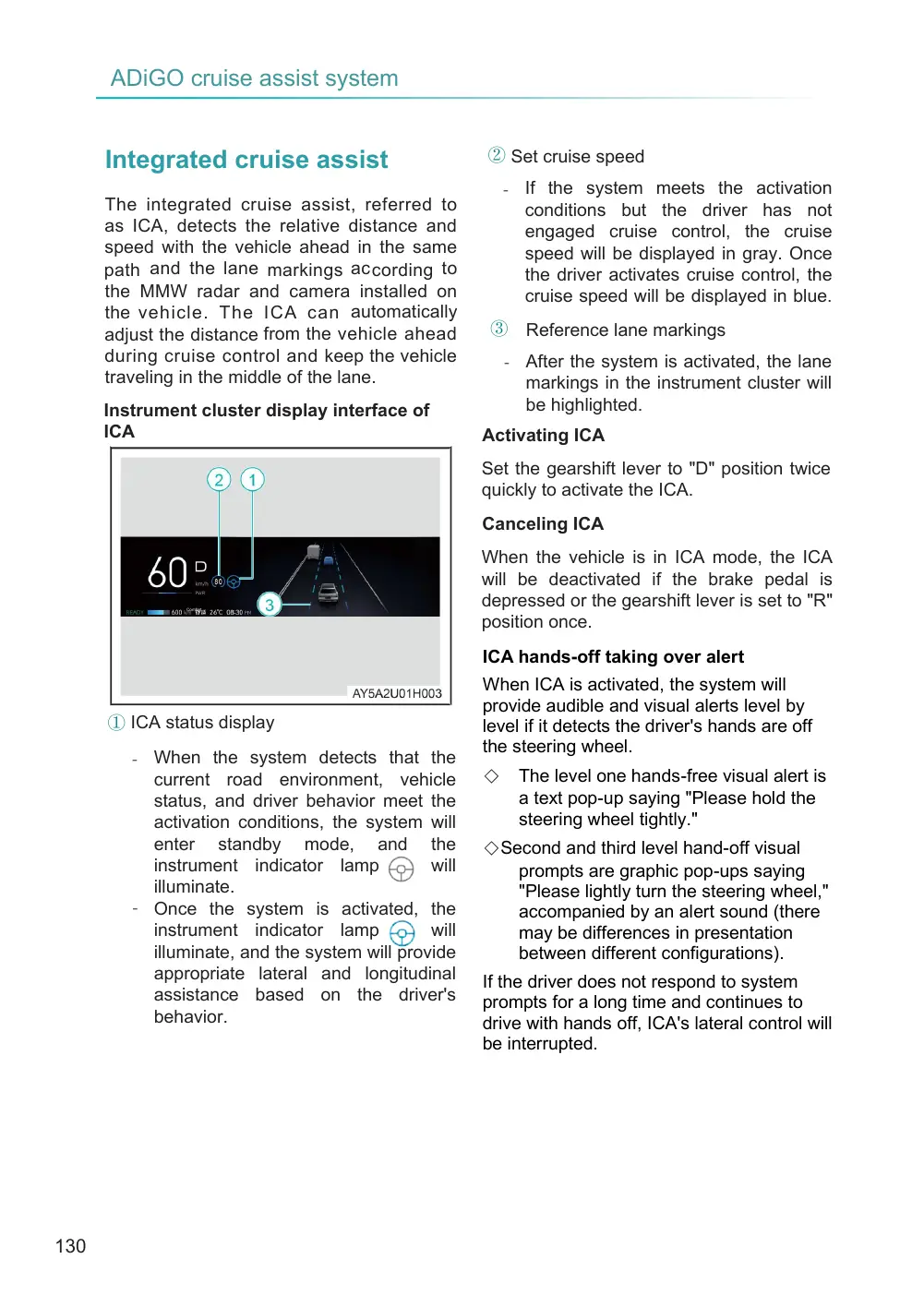
① ICA status display
- When the system detects that the current road environment, vehicle status, and driver behavior meet the activation conditions, the system will enter standby mode, and the instrument indicator lamp will illuminate. - Once the system is activated, the instrument indicator lamp will illuminate, and the system will provide appropriate lateral and longitudinal assistance based on the driver's behavior.
② Set cruise speed
- If the system meets the activation conditions but the driver has not engaged cruise control, the cruise speed will be displayed in gray. Once the driver activates cruise control, the cruise speed will be displayed in blue.
③ Reference lane markings
- After the system is activated, the lane markings in the instrument cluster will be highlighted.
Activating ICA
Set the gearshift lever to "D" position twice quickly to activate the ICA.
Canceling ICA
When the vehicle is in ICA mode, the ICA will be deactivated if the brake pedal is depressed or the gearshift lever is set to "R" position once.
ICA hands-off taking over alert
When ICA is activated, the system will provide audible and visual alerts level by level if it detects the driver's hands are off the steering wheel.
The level one hands-free visual alert is a text pop-up saying "Please hold the steering wheel tightly."
◇Second and third level hand-off visual prompts are graphic pop-ups saying "Please lightly turn the steering wheel," accompanied by an alert sound (there may be differences in presentation between different configurations).
If the driver does not respond to system prompts for a long time and continues to drive with hands off, ICA's lateral control will be interrupted.
Page 131
Lateral and longitudinal control Once the ICA function is activated, the system will maintain the vehicle's speed longitudinally or maintain a safe distance from the vehicle ahead while keeping the vehicle centered in its lane. The ICA function may deactivate or become unavailable under the following circumstances, including but not limited to:
◇ The curvature of the lane markings is too sharp, both lane markings are lost for an extended period, or the lane is too wide or too narrow. ◇ The turn signal lamp is activated. (Depending on vehicle configuration and function settings, suppression conditions may vary) ◇ The driver exerts a significant steering force to take control of the steering wheel. ◇ The driver presses the brake pedal. ◇ The driver opens the driver's door, front hood, or liftgate, or unfastens the seat belt.
◇ The driver shifts the gear to a non-forward gear. ◇ The driver engages the electronic parking brake (EPB) or operates the shift lever to exit the function. ◇ A higher-priority function (e.g., emergency lane keeping or other active safety functions) is triggered.
◇ The anti-lock braking system (ABS) is activated. ◇ The traction control system (TCS) is activated. ◇ The vehicle severely crosses lane lines.
◇ The vehicle's speed does not meet the system's design requirements.
◇ The windshield wipers are set to high speed for an extended period. ◇ The sensors are obstructed.
◇ The system malfunctions.
System limitations
The ICA system has certain limitations. For limitations related to longitudinal control, please refer to the description of adaptive cruise control (ACC). Lateral control may experience abnormal steering control due to incorrect lane marking detection or failure to detect lane markings. The system's lateral control may be affected, misoperate, or fail to function even if the feature is turned on and displayed as active under the following circumstances, including but not limited to:
◇ Restricted sensor detection scenarios.
- Camera detection limitations, such as changes in the installation position, dirty, damaged, or fogged windshield, obstructions in the camera area, or water splashes or dust kicked up by the vehicle ahead. - Restricted radar detection scenarios, such as changes in installation position or radar obstructions.
- Adverse weather conditions, such as heavy rain, snow, sandstorms, dense fog, smog, or dust storms. - Sudden changes in lighting conditions, such as direct sunlight, headlights from oncoming traffic, reflections from water on the road, or entering/exiting tunnels. - Poor lighting conditions, such as dawn, dusk, dark tunnels, or roads without street lighting at night.
◇ Difficult object scenarios ahead.
- Construction zone facilities, such as barriers, water-filled barriers, road guardrails, etc.
Page 132
Irregular temporary obstacles, such as debris on the road, overturned vehicles, or temporarily placed tripods.
Unusual vehicles, such as trucks loaded with hay bales, cement mixers, or dump trucks.
Scenarios involving animals, pedestrians crossing, vehicles parked or angled across the road, and two-wheeled vehicles.
Complex road environments.
Absence of lane markings or scenarios where lane markings are worn, covered, overlapped, or unusually colored, such as crossroads without lane markings, road forks, or road merges.
Lanes that are too wide or too narrow.
High-speed driving through sharp curves.
Significant longitudinal or lateral slopes in the driving area.
Changes in the number of lanes in the driving area.
Markings or objects on the road that affect lane recognition, such as skid marks, road seams, road guide lines, or projections from barriers, guardrails, overpasses, or other objects near lane markings.
Driving too close to the vehicle ahead or when the vehicle ahead is straddling lane markings, obstructing the view of lane markings.
Severe vehicle shaking due to road bumps.
Slippery, icy, or water-covered roads, or crosswinds causing unstable vehicle conditions.
Sudden changes in the driving behavior of the vehicle ahead, such as sudden acceleration or deceleration.
A vehicle suddenly cutting in close to your vehicle from the side front or your vehicle cutting in close behind a side front vehicle.
Your vehicle approaching a stationary or slow-moving object at high speed.
Other conditions affecting system performance:
Vehicle overload.
Poor vehicle maintenance, such as excessive brake or tire wear, abnormal tire pressure, or misalignment.
Modifications made by the driver to the vehicle, such as replacing the steering mechanism, body electronic stability system, or other execution-related components, or painting the front bumper, which may degrade the performance of the forward radar.
WARNING
◆ ICA only provides a driving assistance function and cannot address all road, traffic and weather conditions. The driver always takes full responsibility for driving, and shall always check the road conditions and actively control the vehicle. ◆ The driver must hold the steering wheel all the time to actively control the vehicle. When the ICA system does not provide proper steering assist or appropriate headway, the driver shall intervene timely.
◆ Improper use of the ICA system or negligence may lead to accidents, so the driver should always control the vehicle, and maintain an appropriate speed and headway to keep the vehicle traveling correctly in the lane, even if using the ICA system.
Page 133
WARNING (Cont'd)
◆ The ICA system is not a collision avoidance system. When the system does not take proper control, the driver must intervene.
◆ Under conditions such as urban traffic, intersections, water-logged or snowy roads, adverse weather, mountain roads, rough roads and highway access, it is recommended not to use ICA.
◆ The ICA system is not always able to identify the lane markings, and in some cases may mistakenly identify or even not identify a lane marking, so the ICA system may not generate lateral assist when needed, or may generate unnecessary lateral assist by mistake.
◆ The ICA system can only use limited capability of steering system, so it cannot cope with all driving conditions. The driver must keep his hands on the steering wheel all the time and drive with care. The driver must hold the steering wheel or reduce the vehicle speed appropriately on high- speed curves.
◆ The ICA system cannot perform braking in face of pedestrians, animals, foreign objects, lowbed trailers or oncoming traffic.
◆ The ICA system cannot address all traffic conditions. For example, the lateral assist may suddenly exit under conditions such as high curvature of lane marking before a sharp curve, and roads without lane markings. The driver must hold the steering wheel all the time to actively control the vehicle.
WARNING (Cont'd)
◆ The driver shall immediately hold the steering wheel immediately after receiving the hands-on reminder. Don’t panic or turn the steering wheel fiercely.
CAUTION
◆ During ICA, if the instrument panel reads "ADiGO cruise assist function limited", it indicates that the intelligent driving system is faulty. It is recommended to contact the GAC Service Center for inspection and repair.
NOTE
◆ The condition that the driver’s hands are lightly holding on the steering wheel may be misinterpreted by the ICA system as the steering wheel out-of-hand.
◆ If the ICA system is inhibited for some reason, it will automatically recover when the working conditions are met.
◆ When judging that the ICA system does not control the vehicle properly, the driver should hold the steering wheel firmly and control it properly, and the ICA function will be interrupted by the driver’s operation. ◆ When the ICA system controls the steering wheel for assistance, the driver can still turn the steering wheel to control the vehicle. When the driver feels an implausible torque applied to the steering wheel by the system, the driver may take over control of the vehicle at any time to drive it at will.