A/C control
Text of these pages
Page 59
A/C control
A/C quick control area
The A/C quick control area at the bottom of the center console display can be operated to quickly turn on the A/C. After A/C is turned on, long press or press and drag the temperature or wind number to show the quick adjustment control. Slide left and right to quickly adjust the A/C temperature or air volume.
Turning on and off the A/C
When the A/C is turned off, tap the "Turn on A/C" button in the quick control area of the center console display to turn on the A/C.
When the A/C is turned on, tap the soft key in the A/C control interface on the center console display to turn off the A/C.
NOTE
◆ AUTO mode will exit when the air volume or air supply mode is adjusted under the Auto Mode.
A/C settings
In any interface of the center console display, tap the temperature or wind numbers in the A/C quick control area at the bottom, to enter the A/C control interface to set the A/C.
◇ Slide the temperature control area of the A/C control interface to adjust the A/C temperature ◇ Slide the air volume control area of the A/C control interface to adjust the air volume control of A/C
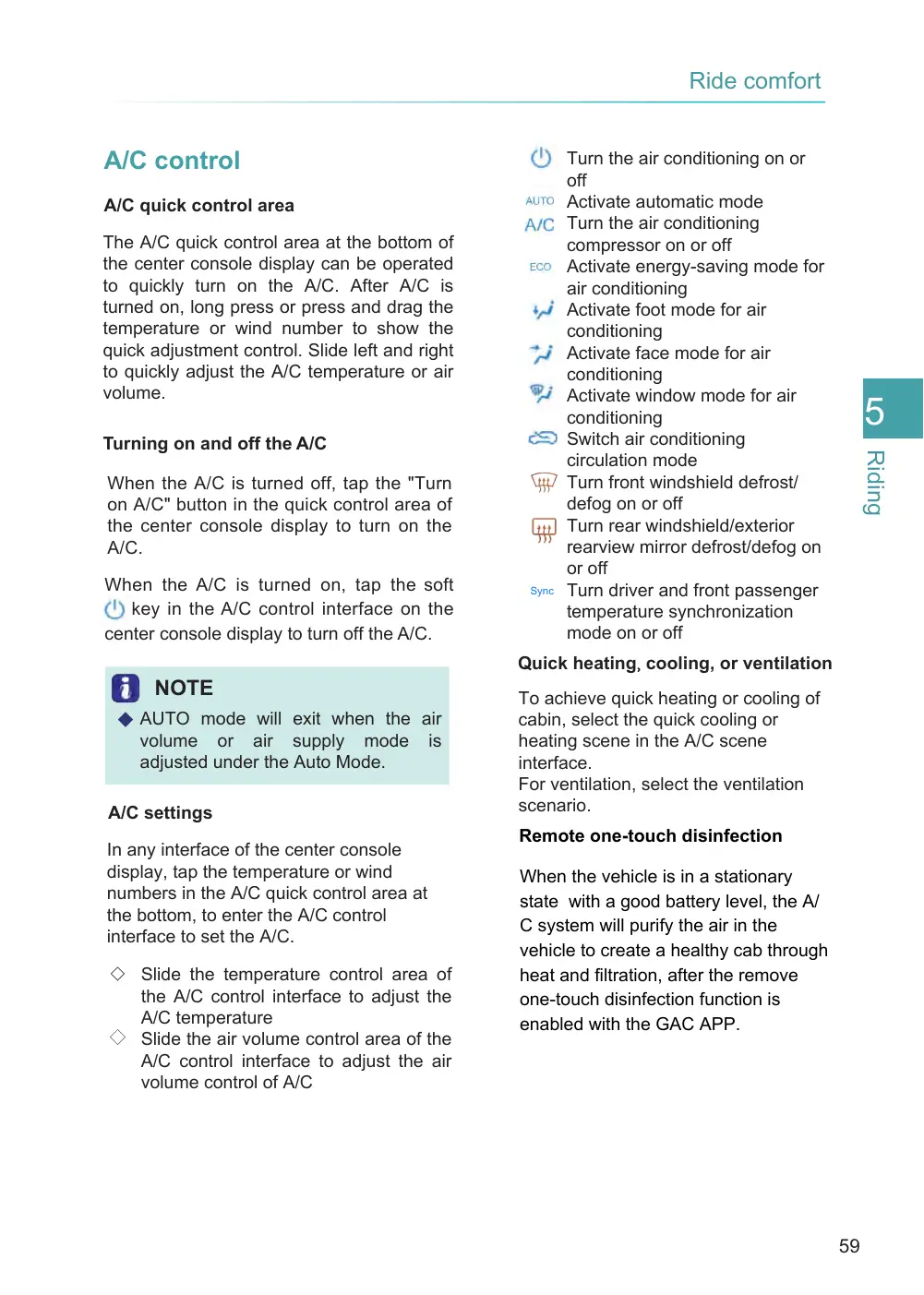
Turn the air conditioning on or off Activate automatic mode Turn the air conditioning compressor on or off Activate energy-saving mode for air conditioning Activate foot mode for air conditioning Activate face mode for air conditioning Activate window mode for air conditioning Switch air conditioning circulation mode Turn front windshield defrost/ defog on or off Turn rear windshield/exterior rearview mirror defrost/defog on or off Turn driver and front passenger temperature synchronization mode on or off
Sync
Quick heating, cooling, or ventilation
To achieve quick heating or cooling of cabin, select the quick cooling or heating scene in the A/C scene interface. For ventilation, select the ventilation scenario.
Remote one-touch disinfection
When the vehicle is in a stationary state with a good battery level, the A/ C system will purify the air in the vehicle to create a healthy cab through heat and filtration, after the remove one-touch disinfection function is enabled with the GAC APP.
Page 60
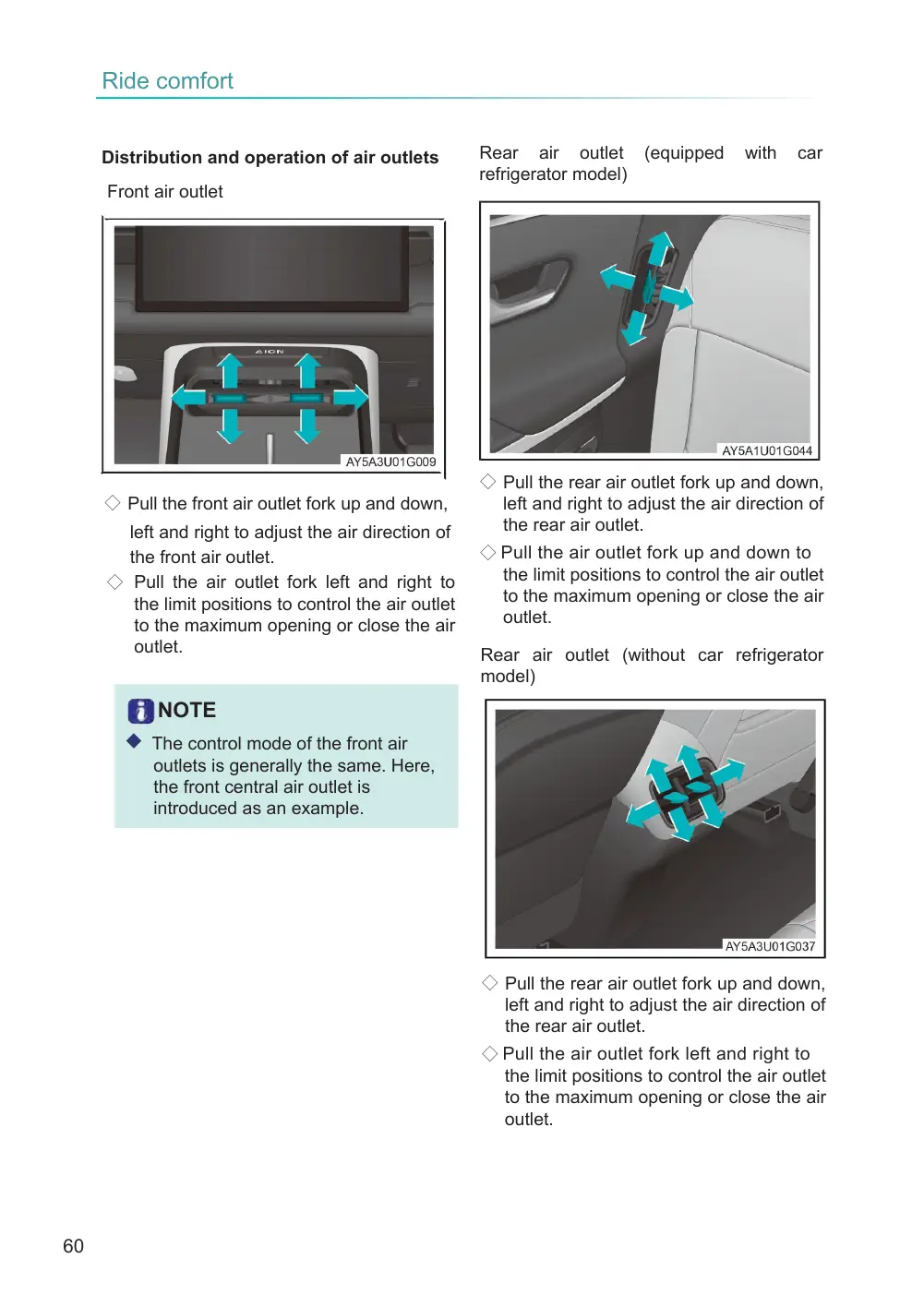
Distribution and operation of air outlets
Front air outlet
◇ Pull the front air outlet fork up and down,
left and right to adjust the air direction of the front air outlet. ◇ Pull the air outlet fork left and right to the limit positions to control the air outlet to the maximum opening or close the air outlet.
NOTE
◆ The control mode of the front air outlets is generally the same. Here, the front central air outlet is introduced as an example.
Rear air outlet (equipped refrigerator model)
with
car
◇ Pull the rear air outlet fork up and down, left and right to adjust the air direction of the rear air outlet.
◇ Pull the air outlet fork up and down to the limit positions to control the air outlet to the maximum opening or close the air outlet.
Rear air outlet (without car refrigerator model)
◇ Pull the rear air outlet fork up and down, left and right to adjust the air direction of the rear air outlet.
◇ Pull the air outlet fork left and right to the limit positions to control the air outlet to the maximum opening or close the air outlet.
Page 61
WARNING
◆ Long-term activation of recirculation mode will cause accumulation of carbon dioxide in the cabin, which is bad for keeping the driver clearheaded.
◆ Activation of the recirculation mode in cold or rainy days can cause the windows to mist up, affecting the driver’s visibility.
◆ The front windshield defrost/defog function may cause the outer surface of front windshield to mist up, affecting the driver's visibility.
NOTE
◆ In AUTO mode, when the outlet air is at high temperature, most of the air comes out through the floor outlets; when the outlet air is at low temperature, most of the air comes out through the panel outlets.
◆ When the A/C is on, tap the A/C button in the center console display to make the A/C system exit the cooling mode and blow natural air.
◆ If the defrost/defog function of the rear windshield and exterior rearview mirrors is not manually turned off, it will automatically turn off after continuous operation for a period of time. ◆ The temperature shown in the center console display is the target value of the temperature setting, rather than the measured inside temperature.
◆ To ensure the best air distribution effect, make sure that all air outlets in the cabin are open.
NOTE (Cont'd)
◆ Speech control can be used to turn on and off the A/C and control temperature and air speed settings.
◆ After the vehicle enters the energy saving or extreme energy saving driving mode, the A/C will also enter the ECO energy saving state. ◆ All doors and windows shall be closed and make sure no people, pets, food, or inflammables are in the vehicle, after the one-touch disinfection function is enabled. ◆ It is suggested that you enter the vehicle after the vehicle stands for 30 min, when using one-touch disinfection in summer.
◆ No other remote operations can be conducted during disinfection. Please do so after disinfection.
◆ Please download and install the GAC
APP and bind your personal information in advance to ensure normal function of the remote one- touch disinfection.
◆ The self-drying function of the A/C can be enabled via the center console display to guard against damp and inhibit moulds.
◆ When the PM2.5 content in the vehicle is too high and the A/C is closed, the center console display will pop up a prompt to reminder you of turning on the A/C.