Smart key
Text of these pages
Page 12
Smart key
The smart key is a physical key, which can realize common functions including locking/ unlocking and vehicle startup.
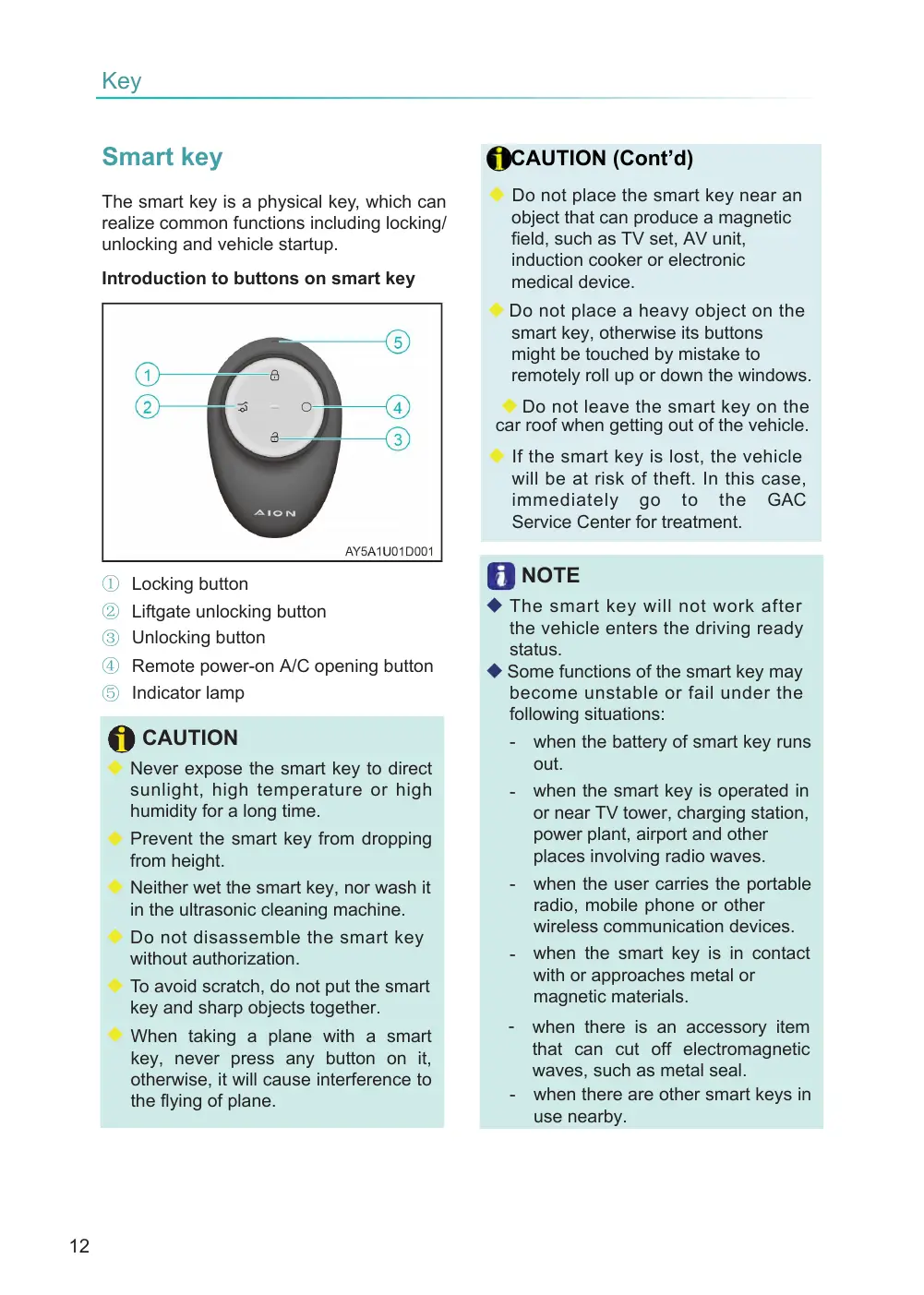
Introduction to buttons on smart key
① Locking button
② Liftgate unlocking button ③ Unlocking button
④ Remote power-on A/C opening button ⑤ Indicator lamp
CAUTION
◆ Never expose the smart key to direct sunlight, high temperature or high humidity for a long time.
◆ Prevent the smart key from dropping from height.
◆ Neither wet the smart key, nor wash it in the ultrasonic cleaning machine.
◆ Do not disassemble the smart key without authorization.
◆ To avoid scratch, do not put the smart key and sharp objects together.
◆ When taking a plane with a smart key, never press any button on it, otherwise, it will cause interference to the flying of plane.
CAUTION (Cont’d)
◆ Do not place the smart key near an object that can produce a magnetic field, such as TV set, AV unit, induction cooker or electronic medical device.
◆ Do not place a heavy object on the smart key, otherwise its buttons might be touched by mistake to remotely roll up or down the windows.
◆ Do not leave the smart key on the car roof when getting out of the vehicle.
◆ If the smart key is lost, the vehicle will be at risk of theft. In this case, immediately go to the GAC Service Center for treatment.
NOTE
◆ The smart key will not work after the vehicle enters the driving ready status. ◆ Some functions of the smart key may become unstable or fail under the following situations:
when the battery of smart key runs out.
- when the smart key is operated in or near TV tower, charging station, power plant, airport and other places involving radio waves.
when the user carries the portable radio, mobile phone or other wireless communication devices. - when the smart key is in contact with or approaches metal or magnetic materials.
- when there is an accessory item that can cut off electromagnetic waves, such as metal seal. - when there are other smart keys in use nearby.
Page 13
NOTE (Cont'd)
◆ As time goes, the battery of smart key may run out if any one of the following situations occurs. :
The remote control function of smart key fails.
The effective operation range of the smart key becomes smaller.
The indicator lamp on the smart key is off. If this occurs, please replace the battery.
◆ The battery of smart key will run out if it is not used for a long time, and if this occurs, please get the battery replaced in the GAC Service Center.