Notices to users
Text of these pages
Page 1
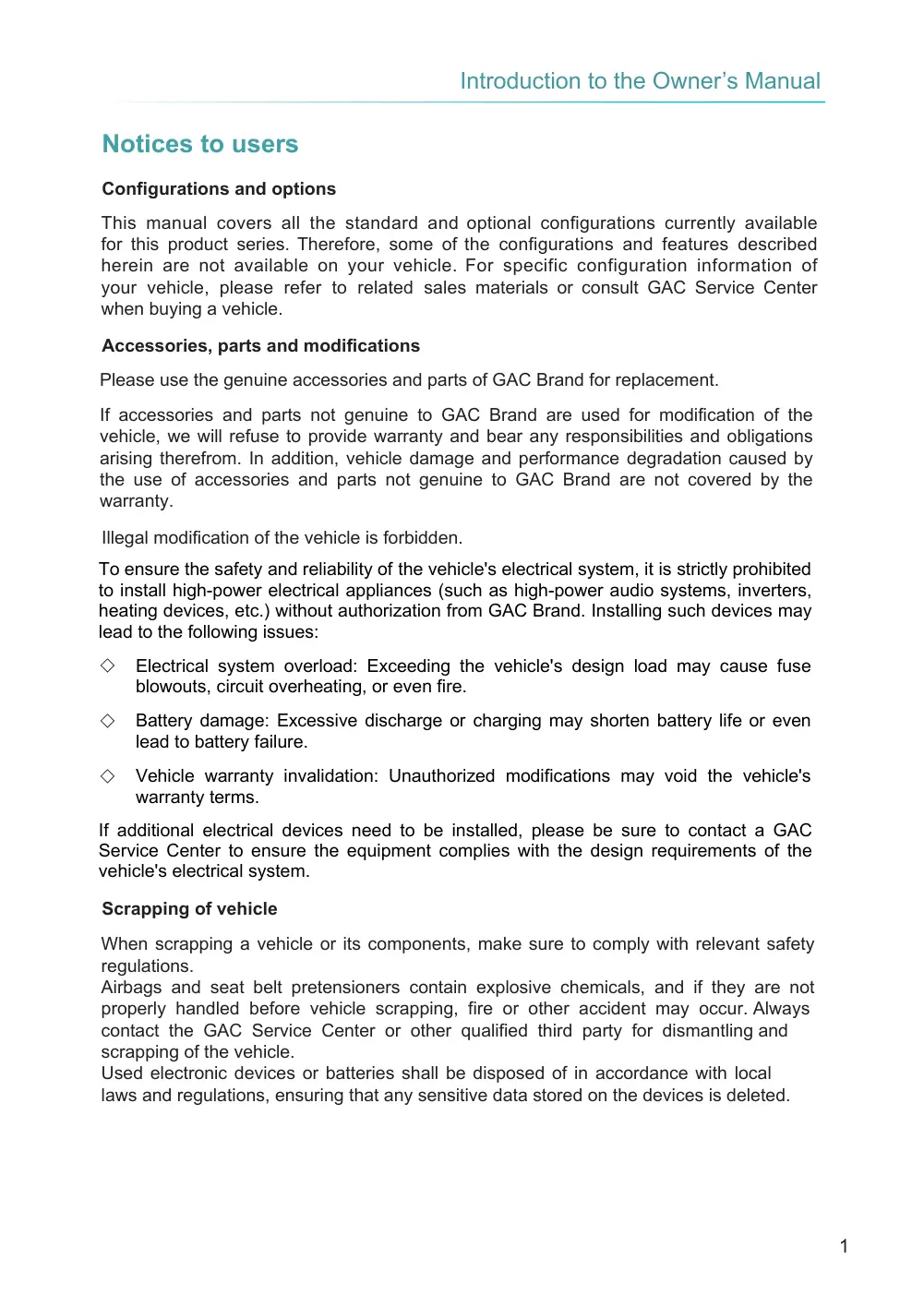
This manual covers all the standard and optional configurations currently available for this product series. Therefore, some of the configurations and features described herein are not available on your vehicle. For specific configuration information of your vehicle, please refer to related sales materials or consult GAC Service Center when buying a vehicle.
Please use the genuine accessories and parts of GAC Brand for replacement.
If accessories and parts not genuine to GAC Brand are used for modification of the vehicle, we will refuse to provide warranty and bear any responsibilities and obligations arising therefrom. In addition, vehicle damage and performance degradation caused by the use of accessories and parts not genuine to GAC Brand are not covered by the warranty.
To ensure the safety and reliability of the vehicle's electrical system, it is strictly prohibited to install high-power electrical appliances (such as high-power audio systems, inverters, heating devices, etc.) without authorization from GAC Brand. Installing such devices may lead to the following issues:
Electrical system overload: Exceeding the vehicle's design load may cause fuse blowouts, circuit overheating, or even fire.
Battery damage: Excessive discharge or charging may shorten battery life or even lead to battery failure.
Vehicle warranty invalidation: Unauthorized modifications may void the vehicle's warranty terms.
If additional electrical devices need to be installed, please be sure to contact a GAC Service Center to ensure the equipment complies with the design requirements of the vehicle's electrical system.
When scrapping a vehicle or its components, make sure to comply with relevant safety regulations. Airbags and seat belt pretensioners contain explosive chemicals, and if they are not properly handled before vehicle scrapping, fire or other accident may occur. Always contact the GAC Service Center or other qualified third party for dismantling and scrapping of the vehicle. Used electronic devices or batteries shall be disposed of in accordance with local laws and regulations, ensuring that any sensitive data stored on the devices is deleted.
Notices to users
Configurations and options
Accessories, parts and modifications
Illegal modification of the vehicle is forbidden.
Scrapping of vehicle
Page 2
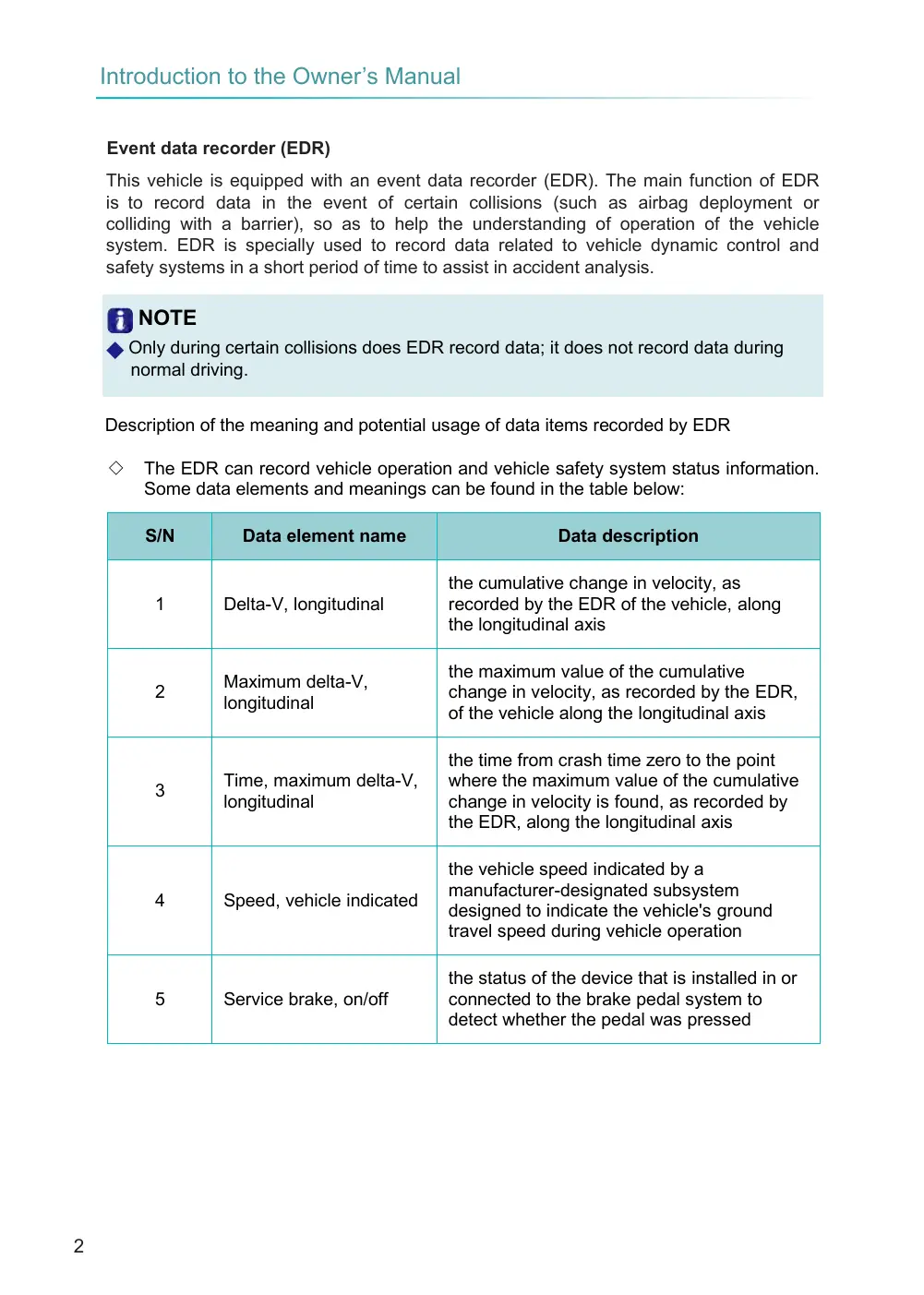
This vehicle is equipped with an event data recorder (EDR). The main function of EDR is to record data in the event of certain collisions (such as airbag deployment or colliding with a barrier), so as to help the understanding of operation of the vehicle system. EDR is specially used to record data related to vehicle dynamic control and safety systems in a short period of time to assist in accident analysis.
◆ Only during certain collisions does EDR record data; it does not record data during normal driving.
Description of the meaning and potential usage of data items recorded by EDR
The EDR can record vehicle operation and vehicle safety system status information. Some data elements and meanings can be found in the table below:
the cumulative change in velocity, as recorded by the EDR of the vehicle, along the longitudinal axis
the maximum value of the cumulative change in velocity, as recorded by the EDR, of the vehicle along the longitudinal axis
the time from crash time zero to the point where the maximum value of the cumulative change in velocity is found, as recorded by the EDR, along the longitudinal axis
the vehicle speed indicated by a manufacturer-designated subsystem designed to indicate the vehicle's ground travel speed during vehicle operation
the status of the device that is installed in or connected to the brake pedal system to detect whether the pedal was pressed
Event data recorder (EDR)
NOTE
S/N
Data element name
1
Delta-V, longitudinal
Maximum delta-V, longitudinal
2
Time, maximum delta-V, longitudinal
3
4
Speed, vehicle indicated
5
Service brake, on/off
Data description
Page 3
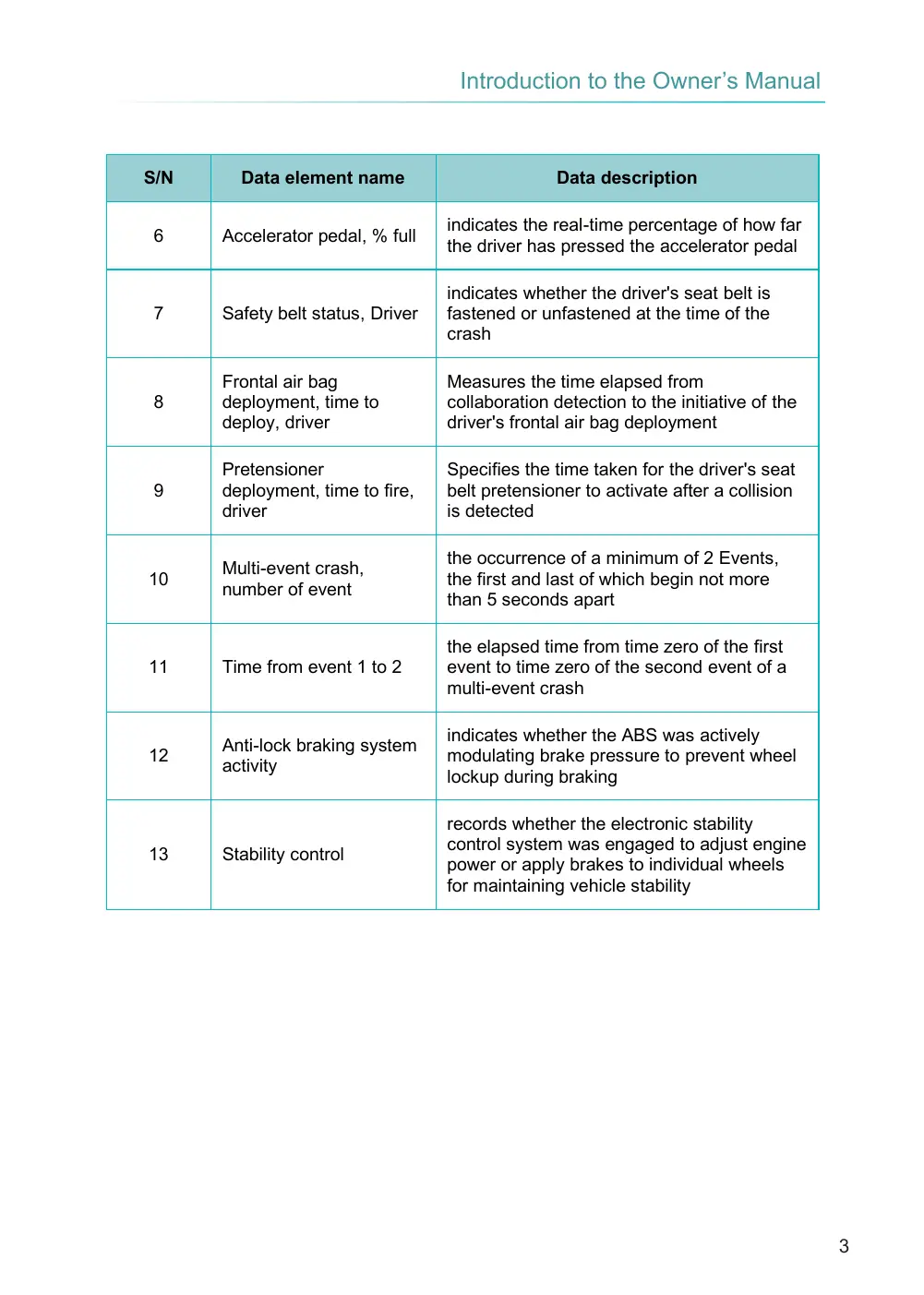
indicates the real-time percentage of how far the driver has pressed the accelerator pedal
indicates whether the driver's seat belt is fastened or unfastened at the time of the crash
Measures the time elapsed from collaboration detection to the initiative of the driver's frontal air bag deployment
Specifies the time taken for the driver's seat belt pretensioner to activate after a collision is detected
the occurrence of a minimum of 2 Events, the first and last of which begin not more than 5 seconds apart
the elapsed time from time zero of the first event to time zero of the second event of a multi-event crash
indicates whether the ABS was actively modulating brake pressure to prevent wheel lockup during braking
records whether the electronic stability control system was engaged to adjust engine power or apply brakes to individual wheels for maintaining vehicle stability
S/N
Data element name
6
Accelerator pedal, % full
7
Safety belt status, Driver
Frontal air bag deployment, time to deploy, driver
8
Pretensioner deployment, time to fire, driver
9
Multi-event crash, number of event
10
11
Time from event 1 to 2
Anti-lock braking system activity
12
13
Stability control
Data description
Page 4
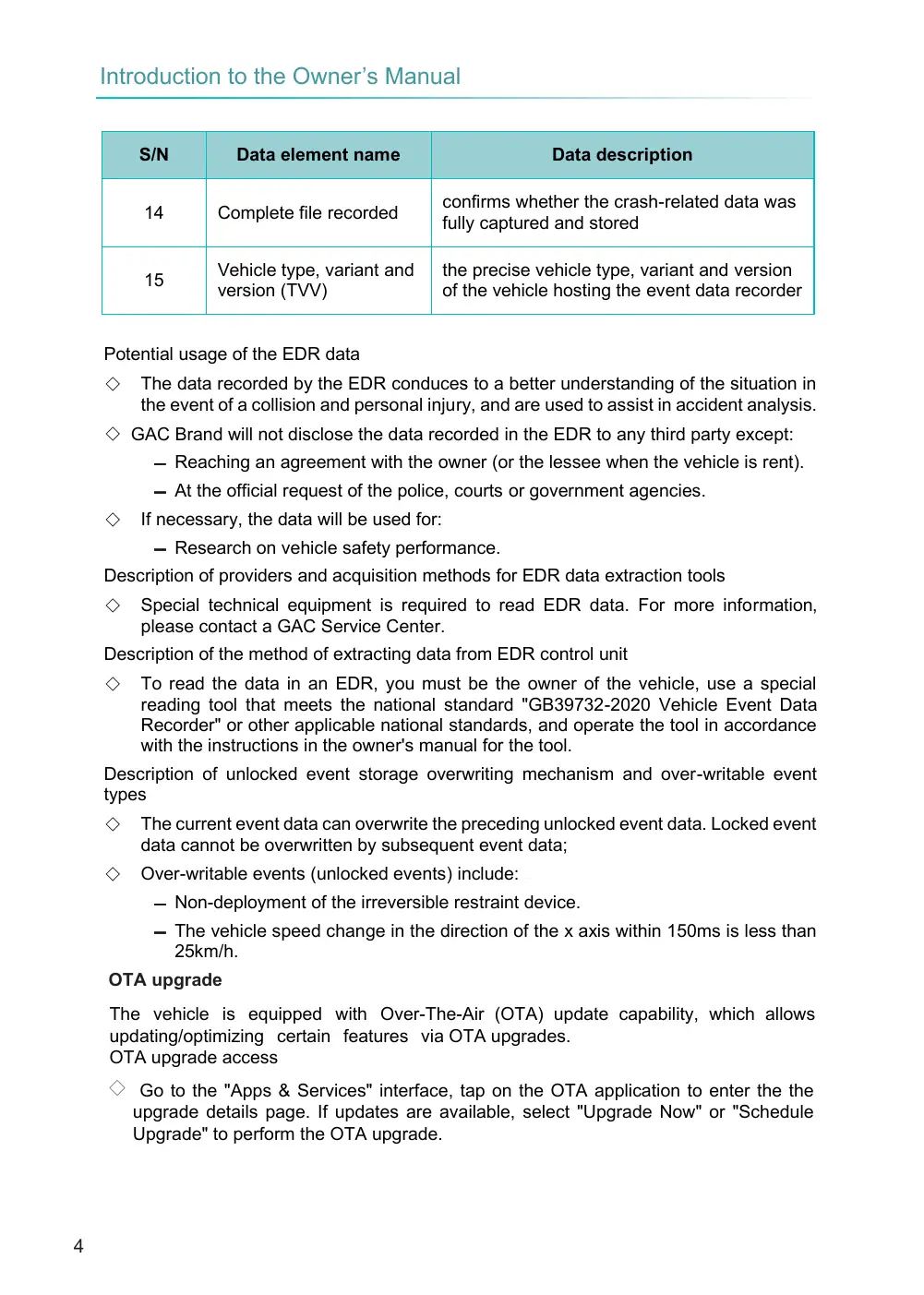
confirms whether the crash-related data was fully captured and stored
the precise vehicle type, variant and version of the vehicle hosting the event data recorder
The data recorded by the EDR conduces to a better understanding of the situation in the event of a collision and personal injury, and are used to assist in accident analysis.
◇ GAC Brand will not disclose the data recorded in the EDR to any third party except:
Reaching an agreement with the owner (or the lessee when the vehicle is rent).
At the official request of the police, courts or government agencies.
Research on vehicle safety performance.
Description of providers and acquisition methods for EDR data extraction tools
Special technical equipment is required to read EDR data. For more information, please contact a GAC Service Center.
Description of the method of extracting data from EDR control unit
To read the data in an EDR, you must be the owner of the vehicle, use a special reading tool that meets the national standard "GB39732-2020 Vehicle Event Data Recorder" or other applicable national standards, and operate the tool in accordance with the instructions in the owner's manual for the tool.
Description of unlocked event storage overwriting mechanism and over-writable event types
The current event data can overwrite the preceding unlocked event data. Locked event data cannot be overwritten by subsequent event data;
Over-writable events (unlocked events) include:
Non-deployment of the irreversible restraint device.
The vehicle speed change in the direction of the x axis within 150ms is less than 25km/h.
The vehicle is equipped with Over-The-Air (OTA) update capability, which allows updating/optimizing certain features via OTA upgrades. OTA upgrade access
◇ Go to the "Apps & Services" interface, tap on the OTA application to enter the the upgrade details page. If updates are available, select "Upgrade Now" or "Schedule Upgrade" to perform the OTA upgrade.
S/N
Data element name
14
Complete file recorded
Vehicle type, variant and version (TVV)
15
Potential usage of the EDR data
If necessary, the data will be used for:
OTA upgrade
Data description
Page 5
When an update for upgrade is available, a styled notification icon appear in the system settings.
When an update for upgrade is available, a pop-up will notify you of the upgradable version.
Tap "Upgrade Now" to start the immediate upgrade process. This will lead to a 90- second countdown on the pre-upgrade preparation page. If all conditions are met when the countdown ends, the upgrade installation will begin. If the upgrade conditions are not met, relevant prompts will be provided. You can follow the instructions to meet the upgrade conditions and retry.
Tap "Schedule Upgrade" to set a scheduled upgrade time. Follow the prompts on the central console display to complete the scheduled upgrade setup. When the scheduled time is reached and the upgrade conditions are met, the upgrade process will begin automatically.
If the upgrade is successful, a notification will appear indicating success. You can tap to view the version information and update details. If the upgrade fails, please contact after-sales support.
During pre-upgrade preparation, follow the on-screen guidance to ensure the vehicle meets the upgrade conditions, such as exiting and locking the vehicle.
Please be patient during the upgrade process and do not use the vehicle until the upgrade is complete. During the upgrade, vehicle functions will be temporarily unavailable.
To ensure safety, do not forcibly drive the vehicle or disconnect the battery during the upgrade process.
To ensure vehicle safety, if the upgrade fails, the software will revert to the previous version.
If you encounter any issues related to the upgrade, it is recommended to contact a GAC Service Center.
Due to continue improvement and upgrade of vehicle, this manual may be updated irregularly without notice.
The screenshots of App, panels, and the center console display interfaces contained in this manual are only applicable to the current version, and the display or process may change due to software update in the future.
OTA upgrade notifications
◇ OTA upgrade icon on interface
◇ Automatic pop-up notification
Enter OTA upgrade
OTA upgrade results
NOTE:
Time-based effectiveness of the Manual
will